

What is n8n? Workflow automation on your own server
Picture an accounting office: every request that arrives through the contact form on its website is copied by hand into an email, and from there into the customer list. At ten requests a day this works; at a hundred a day mistakes start. That is where the question "what is n8n" gets its short answer: n8n is a workflow automation tool that turns this kind of repetitive work into automatic flows between applications. In this post we explain how n8n works, what it is used for and how to run it safely on your own server.
What is n8n and how does it work?
n8n lets you build workflows in a visual editor that opens in your browser. Each workflow is made of connected boxes called nodes. A node receives data, does one job and passes the result to the next node. Sending an email, adding a row to a spreadsheet, calling an API or splitting the path in two based on a condition are each a separate node.
Every flow starts with a trigger. The trigger decides when the flow runs. The three most common triggers are the Schedule Trigger, which runs at set intervals; the webhook, which runs when an HTTP request arrives from outside; and app triggers, which watch for an event in an application. A webhook is a unique address n8n gives you; when a form, a payment system or a monitoring tool sends data to that address, the flow runs.
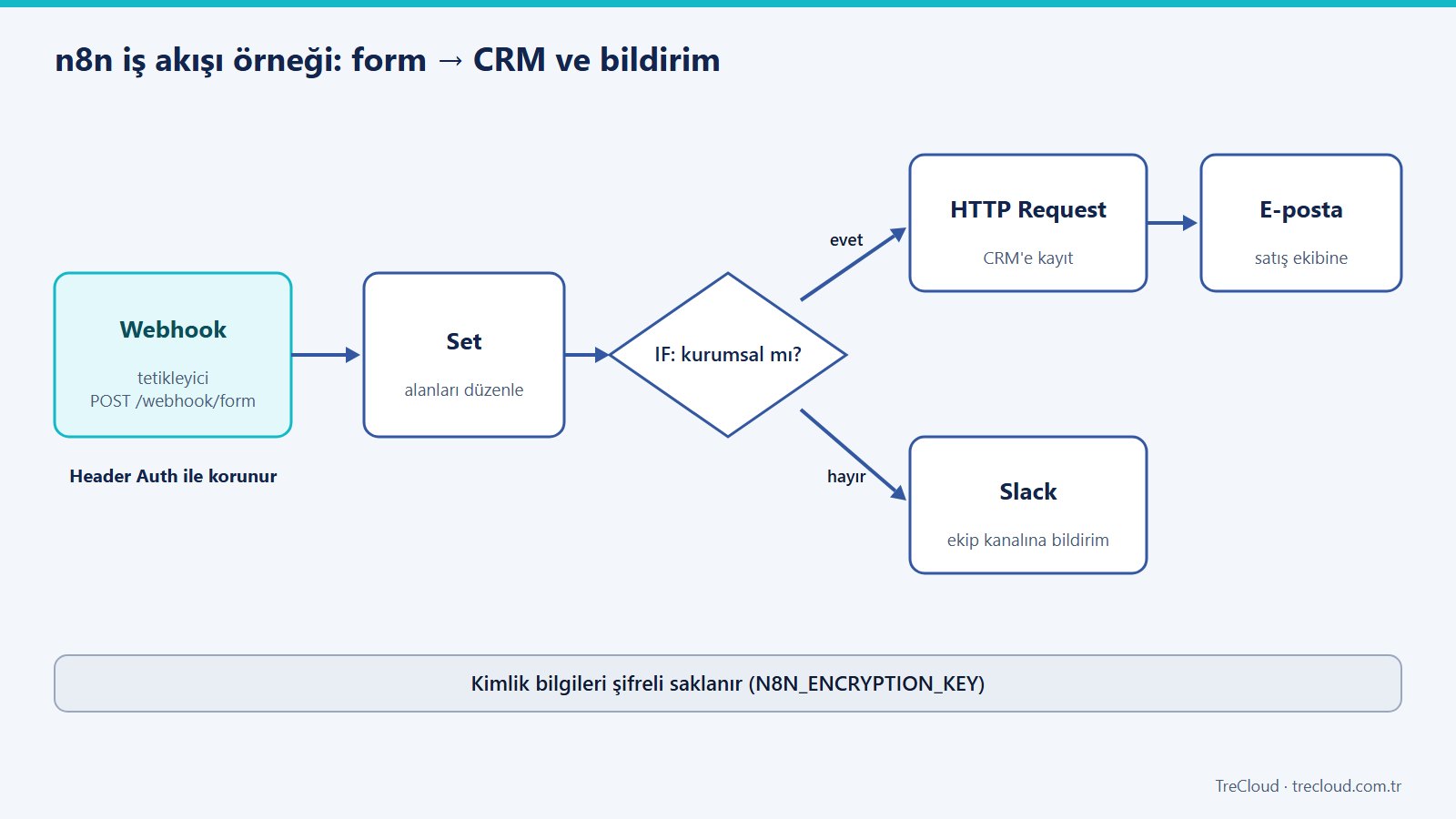
To connect to other services a flow needs usernames, passwords or API keys. n8n stores these separately as credentials and encrypts them. You do not type an API key into every node; you define it once and select it in your flows.
The licence is worth knowing too. n8n's source code is open, but it is distributed not under a classic open-source licence but under the Sustainable Use License, described as "fair-code". Installing and using it for your own business is allowed; for cases such as offering n8n to others as a commercial service, read the licence text and the n8n documentation.
Example workflows
n8n's strength comes from chaining steps that are simple on their own. The examples below are common, realistic flows that can be built with n8n's built-in nodes or the generic HTTP Request node.
Form → email and customer list
The form on your site posts its data to a webhook address. n8n receives the data, tidies the fields with a Set node and uses an IF node to separate business from individual requests. Business requests go to the sales team by email, and the same record is added to your CRM with an HTTP Request node. The job an employee used to copy by hand is done by the flow in seconds.
Invoice PDF → S3 storage
A shop taking 300 orders a day wants its invoice PDFs in a tidy archive instead of piling up in a mailbox. n8n takes the attached file, renames it with the date and order number and uploads it to a bucket with the S3 node. Because the S3 node lets you enter a custom endpoint, it also works with S3-compatible storage other than Amazon; TreCloud S3 object storage plans can be the target. We explained the S3 concepts in What is S3 object storage.
Downtime alert → Telegram
A monitoring tool such as Uptime Kuma can send a notification to a webhook address when your site stops responding. n8n receives it, decides who should get it based on working hours and sends a short message to the on-call team's group with the Telegram node. The same flow can send a second "resolved" message when the problem clears.
Scheduled report
A Schedule Trigger runs every morning at 08:30, pulls yesterday's sales numbers from an API, prepares a short summary and emails it to managers. Nobody has to remember to pull the report.
Cloud service or your own server?
You can use n8n in two ways: on n8n's own cloud service or on a server you host yourself (self-hosted). With the cloud service, installation, updates and backups are the provider's job; you only deal with your flows. On your own server those jobs are yours, and in return you decide where the data lives and how the system is configured.
Data location is the deciding question for many companies. If a flow carries customer names, phone numbers or invoice details, that data is also kept in the flow's execution history. When you run self-hosted n8n on a server in Türkiye, flow data and credentials stay on that server. This makes the architecture side easier when you assess your KVKK obligations; do the legal assessment with your own adviser.
Security for your own n8n
A self-hosted n8n is an internet-facing application holding the keys to other systems. A few things need to be set up correctly from the start.
A webhook address is not a secret key
A webhook address contains a hard-to-guess path, but it is not a password. The address can end up in a browser history, a log file or a screenshot. Choose an authentication method such as Basic Auth or Header Auth on the Webhook node and configure the same header in the sending system. Validating incoming data with an IF node stops unexpected requests early. n8n separates the test URL used while building a flow from the production URL that works once the flow is activated; give external systems the production URL.
Do not lose the encryption key
Credentials are encrypted with n8n's encryption key. You can supply this key yourself with the N8N_ENCRYPTION_KEY variable; if you do not, n8n generates one on first start and writes it to its data folder. If the key changes when you move or reinstall the server, stored credentials can no longer be read. Keep the key with your backup, but separately and securely.
Stay up to date
n8n releases often, and security fixes ship with those releases. Back up before updating, read the release notes and schedule the update outside busy hours. Use a strong password and two-step verification on the owner account, and do not open the editor to people who do not need it.
Resource needs
For a small team with a few flows, n8n is a light application. Needs grow with the number of flows running at the same time, the size of the data they process and the amount of file handling. Large PDFs, images or spreadsheets with thousands of rows push memory use up quickly. Execution history also fills the disk over time; review the pruning settings that control how long history is kept (e.g. EXECUTIONS_DATA_MAX_AGE). As the number of flows and the load grow, a PostgreSQL database is a healthier choice than the default SQLite. Detailed options are in the n8n hosting documentation.
n8n on TreCloud application hosting
For those who want n8n without managing a server, TreCloud application hosting offers n8n Small, n8n Medium and n8n Large plans. Each application runs as a separate project on Docker. Resource values are listed on the plan card; if your needs grow, extra disk, extra memory and extra CPU add-ons are available. The current price is shown on the product page.
The service page in the customer panel has four tools. The Application screen shows the address, the "Open application" button, start/stop/restart actions and the last 48 hours of CPU, memory and disk lines. In n8n the first visitor becomes the owner, so setup protection is on by default: until you create your owner account the site asks for a separate username and password, and once setup is done you remove the protection yourself. Details are in first steps in application hosting.
On the Domain screen you can attach up to three of your own domains; the required A and CNAME records are shown on screen and a Let's Encrypt certificate is issued on the first visit. This step matters if you want your webhook addresses to show your own domain (attaching a domain to an application). The Backups screen puts the application's files and database into S3 storage as a single file; when a new version comes out, "Update" takes a backup first and returns to the previous version if the new one does not start. On the Logs screen you choose a component and see the last 200 lines, with passwords hidden as ***. To build your first flow, see your first n8n workflow.
Installing n8n with Docker on your own VDS
If you want to manage the installation yourself, you can use n8n's official Docker image on a cloud server (VDS). The example below assumes Ubuntu 24.04, Docker Engine with the Compose plugin installed, and a domain pointing to the server (n8n.ornek.com). Caddy sits in front and obtains the HTTPS certificate itself; n8n's port 5678 is not exposed.
First prepare the working folder, the .env file holding the encryption key, and the Caddy configuration:
mkdir -p ~/n8n && cd ~/n8n
printf 'N8N_HOST=n8n.ornek.com\nN8N_ENCRYPTION_KEY=%s\n' "$(openssl rand -hex 32)" > .env
chmod 600 .env
printf 'n8n.ornek.com {\n    reverse_proxy n8n:5678\n}\n' > Caddyfile
Then write the compose.yaml file in the same folder:
services:
  n8n:
    image: docker.n8n.io/n8nio/n8n
    restart: unless-stopped
    environment:
      - N8N_HOST=${N8N_HOST}
      - N8N_PORT=5678
      - N8N_PROTOCOL=https
      - WEBHOOK_URL=https://${N8N_HOST}/
      - N8N_ENCRYPTION_KEY=${N8N_ENCRYPTION_KEY}
      - N8N_PROXY_HOPS=1
      - GENERIC_TIMEZONE=Europe/Istanbul
      - TZ=Europe/Istanbul
    volumes:
      - n8n_data:/home/node/.n8n

  caddy:
    image: caddy:2
    restart: unless-stopped
    ports:
      - "80:80"
      - "443:443"
    volumes:
      - ./Caddyfile:/etc/caddy/Caddyfile:ro
      - caddy_data:/data
      - caddy_config:/config
    depends_on:
      - n8n

volumes:
  n8n_data:
  caddy_data:
  caddy_config:
WEBHOOK_URL makes sure the webhook addresses n8n shows in the editor match the address used from outside; behind a reverse proxy, leaving it out means giving external systems the wrong address. N8N_PROXY_HOPS=1 tells n8n there is a proxy in front. Start it and follow the log:
docker compose up -d
docker compose logs -f n8n
Keep only 22, 80 and 443 open in the firewall; because ports published by Docker can bypass UFW rules, not publishing a port for n8n is a deliberate choice in this example. For first-day settings see first-day firewall. To update, first back up the n8n_data volume and the .env file, then:
cd ~/n8n
docker compose pull
docker compose up -d
Remember that the container itself is not a backup; the volume and key backups should live somewhere else.
Short summary
n8n is a tool built on triggers, nodes and credentials that turns repetitive work into automatic flows. Running it on your own server keeps the data with you, but security, the encryption key and updates become your job. If you do not want to manage a server, the n8n plans in application hosting are a good start; if you do, a VDS with Docker is.
Frequently asked questions
Is n8n free?
Using an n8n you install on your own server for your own business is allowed under its licence. Server, hosting and maintenance costs are yours; read n8n's licence text for commercial use terms.
What happens if I lose the N8N_ENCRYPTION_KEY value?
Stored credentials cannot be decrypted and you will need to redefine the connections in your flows. Keep the key somewhere safe, separate from your backup.
Can I use my webhook address with my own domain?
Yes. In application hosting you attach your own domain on the Domain screen; on your own VDS you set the WEBHOOK_URL variable to your own domain.
Does updating n8n on application hosting lose data?
The update takes a backup first; if the new version does not start, it returns to the previous version and the backup. It is still a good habit to take a manual backup from the Backups screen before major changes.
Comments0
No Comments Yet
Be the first to share your thoughts.
Please sign in or sign up to leave a comment.