

What is S3 object storage and what is it for?
Picture an accounting firm: nightly backups pile up on the same disk as the server, and when the disk fills up someone deletes the oldest ones by hand. They want the backups somewhere else, but they do not want to build and run a second server. S3 object storage exists for exactly this kind of job: you put files at an address over HTTPS and fetch them back when you need them. In this post we explain what S3 object storage is, how it differs from a file system, what it is used for, and what TreCloud S3 plans do and do not include.
What is object storage?
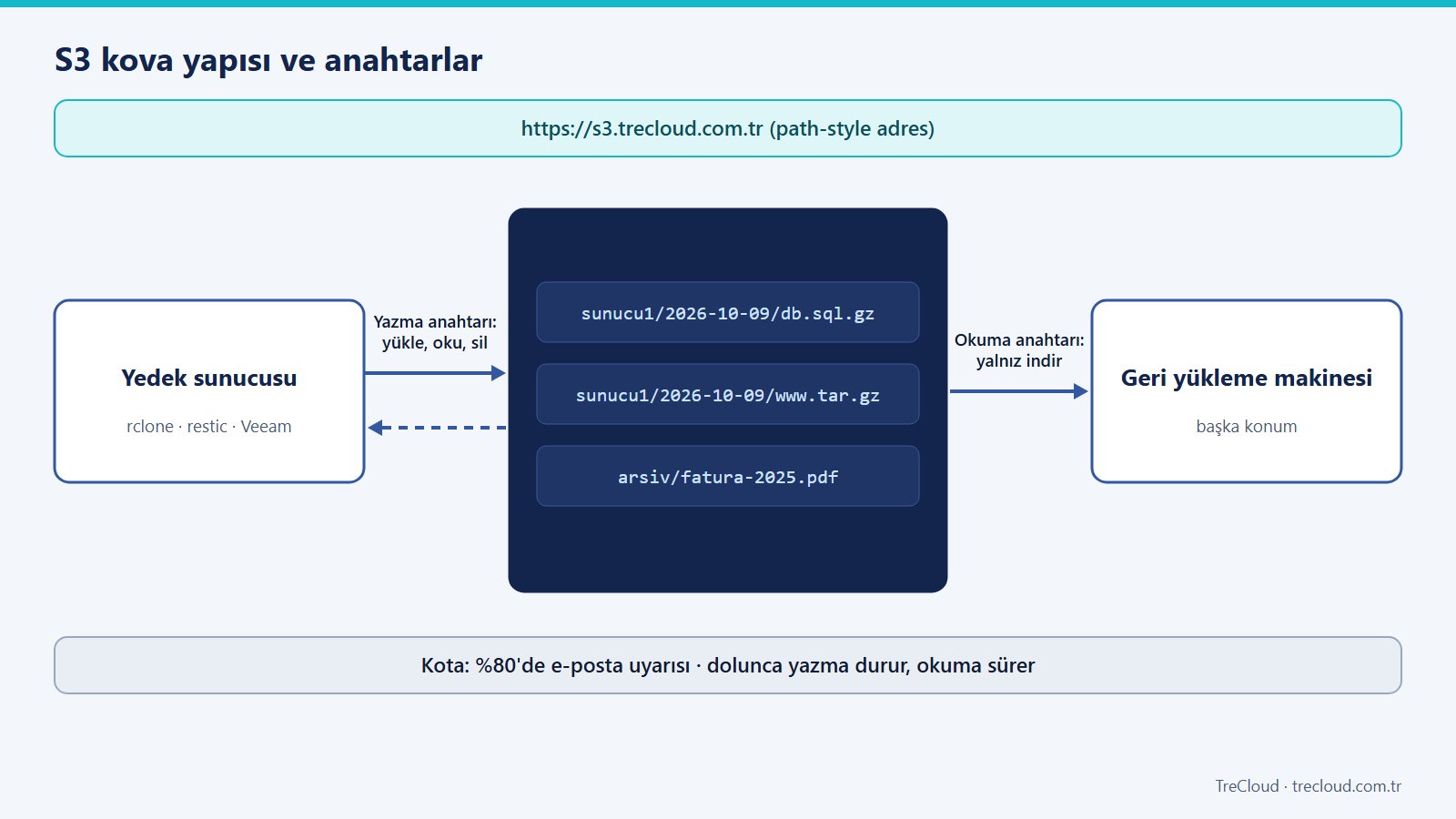
In object storage, data does not live in a folder tree but in a flat space as "objects". Each object has three parts: the data itself (a backup archive, a photo, a PDF), a key used to find it (e.g. sunucu1/2026-10-09/db.sql.gz) and metadata such as size, date and content type. Objects are grouped in a bucket. The bucket is the container the objects sit in; access permissions and quota are applied at bucket level.
The slashes in a key look like folders, but there is no real folder. sunucu1/ is not a directory, it is the beginning of the key (a prefix). Clients display these prefixes as folders, so in rclone or a file tool you still see the view you are used to.
The name "S3" comes from the programming interface (API) Amazon defined for this job. Many programs speak this interface today. A service being "S3 compatible" means you can use it with the same clients (AWS CLI, rclone, restic, Veeam and similar) by changing only the address and the keys.
How it differs from file and block storage
All three storage types can use the same disks; the difference is how you reach the data. Block storage behaves like a disk attached to a server: the operating system formats it and a database runs on it. A file system (a local disk or a network share) works with folders, files and permissions; you can change the middle of a file. With object storage you write an object as a whole and read it as a whole. There is no in-place editing; a change means a new upload.
| Topic | Block | File system | Object (S3) |
|---|---|---|---|
| Access | Server attached to the disk | Attached server or share | API over HTTPS |
| Changes | Block by block | Inside the file | Whole object |
| Good for | Operating system, database | Application files, office share | Backups, archives, large piles of files |
That is why you do not run a live database on object storage, but you can comfortably store the database dump there. Likewise, there are tools that mount a bucket like a folder, but for small, frequently changing files that is a slow and costly path.
What is it used for?
The most common use is as a backup target. The backup tool on your server sends the archive it produces to the S3 address; if the machine breaks, the copy is somewhere else. rclone copies files and folders to the bucket. restic encrypts the backup on its own side, stores repeated chunks only once and writes snapshots to S3. Enterprise backup software such as Veeam recognises S3-compatible storage as a backup repository.
The second use is archiving: files of finished projects, documents from old accounting periods, data that is rarely opened but must be kept. The third is application files. When a web application keeps user uploads in a bucket instead of on its own disk, growing or moving the server becomes easier. A shop taking 300 orders a day can write invoice PDFs to the bucket and read them from there when needed.
Our application hosting product also puts application backups into S3 storage in the same way; details are in running Nextcloud, Vaultwarden and Uptime Kuma without managing a server. Automation tools such as n8n can also write files to a bucket with an S3 node; for the basics of n8n see what is n8n.
S3 is not a backup service
This distinction matters. S3 storage is where a backup is put; you are the one who takes it, schedules it and tests it. A server that sends nothing to the bucket has no backup, even if it has an S3 plan. Our panel reminds you of this at the top of the service page.
The three questions of a backup routine remain yours: when the backup is taken, how many copies are kept for how long, and when a restore was last tested. We explained why a copy must live somewhere else in the 3-2-1 backup rule post. If you also want to hand over taking and monitoring backups, managed backup is a separate product; an S3 plan does not do that on its own.
Access keys and least privilege
You connect to S3 not with a username and password but with a key pair: an access key (your identity) and a secret key (your password). The client signs every request with the secret key. The secret key is not sent in clear over the network, but if it is stolen, all of its owner's permissions are stolen with it.
In TreCloud S3, every service gets two key pairs. The write key uploads, reads and deletes. The read key only downloads. Least privilege becomes concrete here: put the write key on the server that sends backups, and the read key on a machine that will only restore or read files. Even if the read key leaks, nothing in the bucket can be deleted.
The secret part of the write key is shown in the panel only once. You save it in a password manager and hide it with "Anahtarı sakladım" (I saved the key); after that the panel does not show it again. If the key is lost, or you suspect it leaked from a server, "Yeni yazma anahtarı" (new write key) generates a new secret and the old one stops working immediately. So before rotating, list the tools that use the key; after the change you have to update all of them. A step-by-step guide is in the S3 access details and keys article.
Making a bucket public and sharing it without keys is a common mistake; we covered the consequences in the S3 bucket stayed public. Public buckets are not on the TreCloud S3 product card; to share a file, download it from the bucket and share it another way.
Endpoint, path-style and two short examples
You give an S3 client three things: the address (endpoint), the bucket name and the key pair. At TreCloud the endpoint is https://s3.trecloud.com.tr and the connection is over HTTPS (TLS). The bucket name is to followed by your service number, and it is shown on the "Kova" (bucket) line in the panel. Some clients also ask for a region value; take it from the "Bölge" (region) line in the panel, do not guess.
In a path-style address the bucket name goes into the path, not in front of the domain: https://s3.trecloud.com.tr/to1234/dosya.gz. The other form (virtual-hosted style) turns the bucket into a subdomain. TreCloud uses path-style; if you do not enable this setting in your client you will get "bucket not found" or DNS errors.
With AWS CLI
The commands below are for an Ubuntu machine with AWS CLI v2 installed. Replace to1234 with your own bucket.
aws configure
# Enter the Access Key ID, Secret Access Key and the Region value from the panel
aws configure set default.s3.addressing_style path
aws s3 ls s3://to1234 --endpoint-url https://s3.trecloud.com.tr
aws s3 cp yedek-2026-10-09.tar.gz s3://to1234/sunucu1/ --endpoint-url https://s3.trecloud.com.tr
Newer releases of AWS CLI v2 send an extra integrity checksum with each request by default. Some S3-compatible servers may reject it; if you see such an error on upload, these two environment variables fix it:
export AWS_REQUEST_CHECKSUM_CALCULATION=when_required
export AWS_RESPONSE_CHECKSUM_VALIDATION=when_required
For more commands see the using S3 with AWS CLI article, and for the command reference the AWS CLI s3 documentation.
With rclone
In rclone you define a remote. This section in ~/.config/rclone/rclone.conf is enough; since the file holds the secret key, tighten its permissions with chmod 600.
[trecloud]
type = s3
provider = Minio
access_key_id = ACCESS_KEY
secret_access_key = SECRET_KEY
endpoint = https://s3.trecloud.com.tr
region = REGION_FROM_PANEL
force_path_style = true
rclone copy /var/backups trecloud:to1234/sunucu1 --progressrclone copy only adds. rclone sync makes the destination match the source, so a file deleted at the source is also deleted from the bucket. For backups, copy is usually what you want. Details are in the S3 backups with rclone article and in the rclone S3 documentation. If you use restic, the repository address looks like s3:https://s3.trecloud.com.tr/to1234/restic, and you pass the keys with the AWS_ACCESS_KEY_ID and AWS_SECRET_ACCESS_KEY environment variables.
Quota: what happens when it is full?
Every plan has a ceiling: 50 GB, 250 GB or 1 TB. Usage is measured hourly; when you reach 80% of the ceiling you get an email warning. When the ceiling is full, writing stops and reading continues. You can keep downloading existing backups, but new backups will not go through. The panel shows a used/ceiling gauge and a "Şimdi ölç" (measure now) button; newly uploaded files may show up in the measurement a few minutes late.
The practical consequence of a hard quota: set up a routine that notices when your backup script fails. A team that ignores the 80% email ends up without a backup on the night the ceiling fills. Setting a retention rule that deletes old backups in the backup tool (such as forget --prune in restic) keeps the bucket from bloating.
Egress traffic is free; there is no separate charge for data you download during a restore. Current prices are shown on the S3 object storage plans page.
What TreCloud S3 includes and what it does not
Included: an Amazon S3-compatible API, storage in our data centre in Türkiye, an HTTPS endpoint, one bucket per service, a write key pair and a read-only key pair, a hard quota with an 80% warning, a panel view of the files in the bucket (up to 100 of them) and free egress traffic. MinIO runs underneath.
What is not on the product card should be stated just as clearly: object versioning, object lock (immutable backups), lifecycle rules (automatically deleting or moving objects older than a given age), public buckets, static website hosting and automatic copies to another region are not included. If you need one of these, ask through a support ticket before ordering.
The practical meaning of these gaps: without versioning and object lock, someone who gets hold of the write key can delete or overwrite the backups in the bucket. The ways to reduce that risk are clear: keep the write key only on the machine that takes backups, use a tool that encrypts on its own side such as restic, and keep a copy of important backups somewhere else as well. Cleaning up old backups is done by your backup tool instead of a lifecycle rule.
When you cancel the service, the bucket is not deleted right away. To delete it, you open a request in the panel with "Silme iste" (request deletion), type the request number and click "Silmeyi onayla" (confirm deletion). The bucket is deleted 7 days later; during that time you can undo it with "Silmeden vazgeç" (cancel deletion).
In short
S3 object storage keeps files in a bucket under keys and is reached over HTTPS. Think of it not as a disk but as a target for backups, archives and application files. Give the write key only to the machine that sends backups and the read key to the machine that restores; remember to enable path-style and to watch the quota warnings. Taking the backup, setting retention and testing restores always remain part of your own routine.
Frequently asked questions
Can I use S3 object storage like a disk?
There are tools that show a bucket as a folder, but object storage is not a disk. It is not suitable for databases or frequently changing files; use it for backups, archives and large files.
Can I open more than one bucket in a service?
Each service gets one bucket. To separate jobs you can use key prefixes (e.g. sunucu1/, sunucu2/) or order a separate service.
I lost my write secret key, what should I do?
Generate a new one in the panel with "Yeni yazma anahtarı" (new write key). The old one stops working immediately; update every tool that used it with the new key.
Are my files deleted when the ceiling is full?
No. When the ceiling is full, writing stops and reading continues; you can download your existing files. To write again you need to free up space or move to a larger plan.
Where is the data stored?
Data is stored in our data centre in Türkiye. Connections are made over HTTPS (TLS).
Comments0
No Comments Yet
Be the first to share your thoughts.
Please sign in or sign up to leave a comment.