

SPF, DKIM, DMARC: why is your email going to spam?
A shop taking 300 orders a day learns from complaints that some of its order confirmations are landing in customers' spam folders. The server works and the email goes out; the problem is that the receiving side does not recognize the sender. SPF, DKIM and DMARC are three DNS records that prove who may send email on behalf of your domain and that the message was not altered on the way. In this article we explain all three with sample records, along with the sender rules that tightened in 2024 and 2025 and the most common mistakes.
What does the receiving server check?
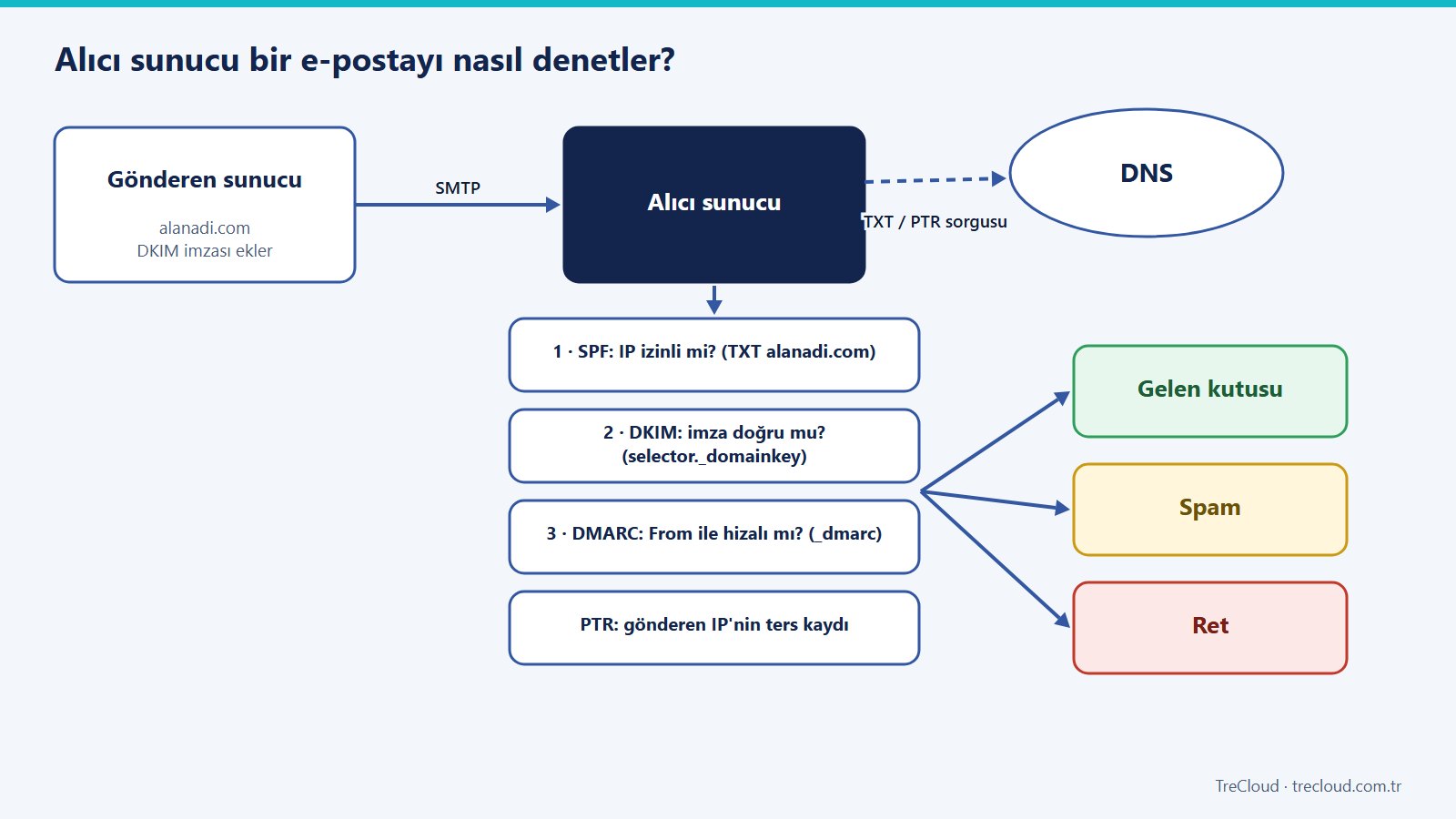
The email protocol SMTP is an old design, and anyone can write any address in the "From" line. That is why receivers such as Gmail or Outlook ask a few questions about every incoming message. Is the sending server allowed to send on behalf of this domain? Was the message changed on the way? What does the domain owner want done if the checks fail? Is the reverse record of the sending IP in order? If the answers are negative, the message lands in spam or is not delivered at all.
The answers to the first three questions are in the SPF, DKIM and DMARC records respectively, and the fourth is in the PTR record. All of them live in DNS, and the receiver queries them for every message.
SPF: who may send?
SPF (Sender Policy Framework) is a TXT record that lists the servers authorized to send email on behalf of your domain; it is defined in RFC 7208. The receiver looks up the SPF record of the domain in the message's envelope sender (Return-Path) and checks whether the IP that delivered the message is on the list.
alanadi.com. TXT "v=spf1 mx a include:_spf.ornek-servis.com ip4:203.0.113.10 -all"The final term says what to do with servers not on the list. -all (fail) means "these are not my servers"; ~all (softfail) means "treat as suspicious." Once you are sure you have listed all your sending sources, -all is clearer; starting with ~all during a transition is common.
Two rules: one record, at most 10 lookups
A domain can have only one SPF record. Adding one record for the accounting software and another for the newsletter service makes both invalid (permerror); the fix is to merge everything into a single line. The second rule: the total number of terms that require a DNS lookup, such as include, a, mx, ptr, exists and redirect, cannot exceed 10. Since each include brings its own lookups, the limit is easily exceeded once four or five services are added. ip4 and ip6 terms do not count as lookups.
SPF has a weak spot: when a message is forwarded to another address, the delivering IP changes and SPF breaks. This is where DKIM matters.
DKIM: was the message changed on the way?
With DKIM (DomainKeys Identified Mail, RFC 6376), the sending server adds a signature to every message using its private key. The public key is published in DNS under a label called the selector. The receiver reads the d= (domain) and s= (selector) values from the message's DKIM-Signature header, fetches the public key from DNS and verifies the signature.
mail._domainkey.alanadi.com. TXT "v=DKIM1; k=rsa; p=MIIBIjANBgkqh...IDAQAB"Here mail is the selector; the service you use may give it a different name (such as default or s1). If you use more than one sending service, each publishes a separate record with its own selector; SPF's single-record rule does not apply to DKIM. A 2048-bit key is the common choice today. A long key may be split into 255-character chunks in the DNS panel; that is normal, but missing a chunk or a quote while copying breaks the record.
The DKIM signature depends on the message content, not on the sending IP, so it usually survives simple forwarding. That is why you should set up both instead of relying on SPF alone.
DMARC: what happens when checks fail?
DMARC (RFC 7489) ties the SPF and DKIM results to the domain in the "From" line and tells the receiver what you want done if the check fails. The record is published under the _dmarc name:
_dmarc.alanadi.com. TXT "v=DMARC1; p=none; rua=mailto:dmarc-rapor@alanadi.com"The p= value is the policy. none only monitors and collects reports; quarantine asks for failing messages to be put in spam; reject asks for them to be rejected. Receivers regularly send aggregate reports to the rua= address. These reports show which IPs send on your behalf and how many pass the checks.
Tighten the policy step by step
The right order is this: first collect reports for a few weeks with p=none and find the sending sources you forgot. A CRM, invoicing software and the site's contact form are the ones most often forgotten. When all of them pass, move to p=quarantine, and if you see no problems, switch to p=reject. Writing reject on day one can stop your own invoices from ever reaching customers.
Alignment: the part people skip
For DMARC to pass, it is not enough for SPF or DKIM to return "pass"; the domain of the passing check must match the domain in the From line. This is called alignment. One of the two passing with alignment is enough for DMARC.
An example: your newsletter service signs messages with its own domain (d=bulten-servisi.com), and the Return-Path also shows its domain. SPF and DKIM pass, but neither is aligned with alanadi.com, so DMARC fails. The fix is to enable DKIM for your own domain in the service's panel (d=alanadi.com) or to set up a Return-Path on your own domain.
With the default relaxed alignment, subdomains are accepted: posta.alanadi.com matches alanadi.com. Strict alignment can be requested with adkim=s and aspf=s; for most businesses relaxed alignment is enough.
PTR (rDNS): the sending IP's identity
A PTR record is the reverse DNS record that maps an IP address to a name. If you run your own mail server on a VDS, the IP's PTR record should match the name the server introduces itself with (for example mail.alanadi.com), and that name should resolve back to the same IP. The PTR record is set by the provider that owns the IP address; it is not written from your domain panel. Details are in the IPv4 and rDNS (PTR) record article and in our article on mail servers without PTR.
What do Google, Yahoo and Microsoft require?
Large mailbox providers now treat these records as requirements rather than recommendations. Since February 2024, Google and Yahoo have required bulk senders, those sending roughly more than 5,000 messages a day to Gmail, to have all three of SPF, DKIM and DMARC, authentication aligned with the From domain and one-click unsubscribe in marketing messages. Smaller senders are expected to have at least SPF or DKIM plus a valid PTR record. Google also asks that the spam complaint rate be kept low. The current rules are in Google's sender guidelines.
Since May 2025, Microsoft has also required SPF, DKIM and DMARC from high-volume senders to Outlook.com, Hotmail and Live addresses. An office sending a few hundred emails a day stays below these thresholds, but the same checks are applied to its messages too. Setting up all three improves delivery whatever the threshold.
Check your records from the terminal
On Ubuntu the dig command comes with the bind9-dnsutils package. You can see the three records like this:
dig TXT alanadi.com +short
dig TXT _dmarc.alanadi.com +short
dig TXT mail._domainkey.alanadi.com +short
The output of the first command should contain exactly one line starting with v=spf1. In the last command, replace mail with your own selector; you can find it in the s= value of the DKIM-Signature header of a message you sent. For the PTR record of the sending IP:
dig -x 203.0.113.10 +shortThe most practical test is to send a message to a Gmail address and open the "Show original" view in Gmail. It shows PASS or FAIL for SPF, DKIM and DMARC. The Authentication-Results line in the message header gives the same information.
Common mistakes
Most delivery problems come from a few recurring mistakes. You can use this as a checklist:
- Two separate SPF records: adding a second
v=spf1line next to the old one when adding a new service. Merge them into one line. - Exceeding the 10-lookup limit: remove includes for services you no longer use; use
ip4for fixed IPs. - Sending from a web form with the visitor's address: if the contact form puts the visitor's Gmail address in the From line, DMARC alignment is impossible. Use your own address in From and put the visitor's address in Reply-To.
- Reject without reading reports: a forgotten sending source gets silently rejected.
- Copying the DKIM record incompletely: if part of the key is missing, the signature does not verify; check the record with
dig. - Skipping PTR: if you send from your own server, an IP without a reverse record is treated as suspicious by many receivers from the start.
SPF, DKIM and DMARC at TreCloud
The product cards of our business email plans list SPF, DKIM and DMARC support. The plans are based on mailcow and include an antispam/antivirus filter. You can contact our support team to clarify which records to add during setup.
On web hosting plans you can create unlimited email accounts. The Email Deliverability screen in the Email section of cPanel shows the DKIM, SPF and reverse DNS status for your domain, and lists the suggested value if a record is missing or wrong. You add the DMARC record yourself.
Where you write the records depends on which name servers the domain uses. If your domain uses the TreCloud name servers (ns1.trecloud.com.tr, ns2.trecloud.com.tr), you can add TXT records in the client panel via My Domains › domain › Edit DNS Records. If you use another DNS provider, you need to write the records there. A general explanation of record types is in the DNS records article, and the step-by-step settings are in the SPF, DKIM and DMARC settings article. DNS changes can take up to 24 hours to propagate everywhere.
Quick summary
SPF says who may send, DKIM shows the message was not changed, and DMARC says what to do on failure; they make sense when all three work together and align with the From domain. Keep a single SPF record, watch the 10-lookup limit, start DMARC with p=none and tighten it based on the reports, and do not forget the PTR record if you send from your own server.
Frequently asked questions
Will email be delivered without an SPF record?
It will be sent, but receivers such as Gmail and Outlook put unauthenticated messages in spam more often. Everyone sending to Gmail is expected to have at least SPF or DKIM.
Can I add more than one SPF record to a domain?
No. Two SPF records make both invalid. Merge all sending sources into a single v=spf1 line.
Should I set the DMARC policy to reject right away?
No. First review the reports with p=none; once all sources pass, move to quarantine and then to reject.
How do I find my DKIM selector?
The sending service sets the selector and shows it in its panel together with the DKIM record. It also appears in the s= value of the DKIM-Signature header of a message you sent.
Comments0
No Comments Yet
Be the first to share your thoughts.
Please sign in or sign up to leave a comment.