

How to get a .com.tr domain: documents, transfer, WHOIS
A newly founded accounting firm wants a .com.tr domain with its company name and postpones it, thinking "collecting the paperwork will take weeks". That worry dates from before 2022. Today, registering a .com.tr domain requires no documents and follows the "first come, first served" rule. In this article we explain in plain language which .tr extensions still require documents, the registration steps, changing registrars (transfer) and the WHOIS lookup.
Who manages .tr domains
Management of .tr domains moved to Türkiye's Information and Communication Technologies Authority (BTK). The ".tr" Network Information System set up by BTK, TRABİS for short, opened on September 14, 2022. Since then, applications are not made to TRABİS directly but through registrars (KK) accredited by TRABİS. You get the domain from a registrar or from a provider that works with one; the allocation record is kept in TRABİS.
Under the old system, .com.tr required documents such as a trademark certificate or a trade registry record. Some articles on the internet still repeat this. Always check the current rules on the official TRABİS website; if the rules change, TRABİS prevails, not this article.
Extensions with and without documents
TRABİS defines two allocation methods. Allocation without documents has no extra condition, and the order is set by the moment the application reaches TRABİS: first come, first served. In document-based allocation, the applicant gives the registrar the information and documents the extension requires; if they are valid, the name is allocated.
| Method | Extensions | For whom |
|---|---|---|
| Without documents | com.tr, net.tr, org.tr, web.tr, gen.tr, tel.tr, name.tr, biz.tr, tv.tr, info.tr, bbs.tr | Anyone; first come, first served |
| With documents | av.tr, bel.tr, dr.tr, edu.tr, gov.tr, k12.tr, kep.tr, pol.tr, tsk.tr | Extension-specific holders such as lawyers, municipalities, physicians, higher-education institutions, public bodies, schools |
The required document depends on the extension. For example, av.tr requires a current document showing bar registration, dr.tr a certified copy of the medical diploma or graduation certificate, and bel.tr an official letter signed by the municipality's authorized office. Applications for edu.tr, gov.tr, pol.tr and tsk.tr, and k12.tr applications from public bodies, go through TRABİS's own registrar, TRABİS-KK. If you need a document-based name, read the document list on the relevant TRABİS page before applying.
"Without documents" does not mean every name is available. Some names are on the List of Names Closed to Allocation (TAKAL) or the List of Names with Restricted Allocation (TAKIL). If the lookup shows this warning, the name either cannot be allocated at all or is subject to extra conditions.
Direct .tr (example.tr) names
Names in the "example.tr" form, i.e. .tr names without a second-level extension, were opened in stages. First, priority periods were given to existing domain holders; for example, one stage gave priority to holders of an org.tr name as of August 25, 2023, and a later stage to holders of names in other extensions. These names then moved to the "first come, first served" method; according to the TRABİS announcement, allocation under this method started in September 2024.
TRABİS states that some names allocated this way may later go through a second check, documents may be requested during that process, and applications found contrary to the regulations may be cancelled. If you hold example.com.tr and example.tr is free, keeping both is a sensible step for brand protection. One becomes the main address, the other a permanent redirect.
Registering a .com.tr step by step
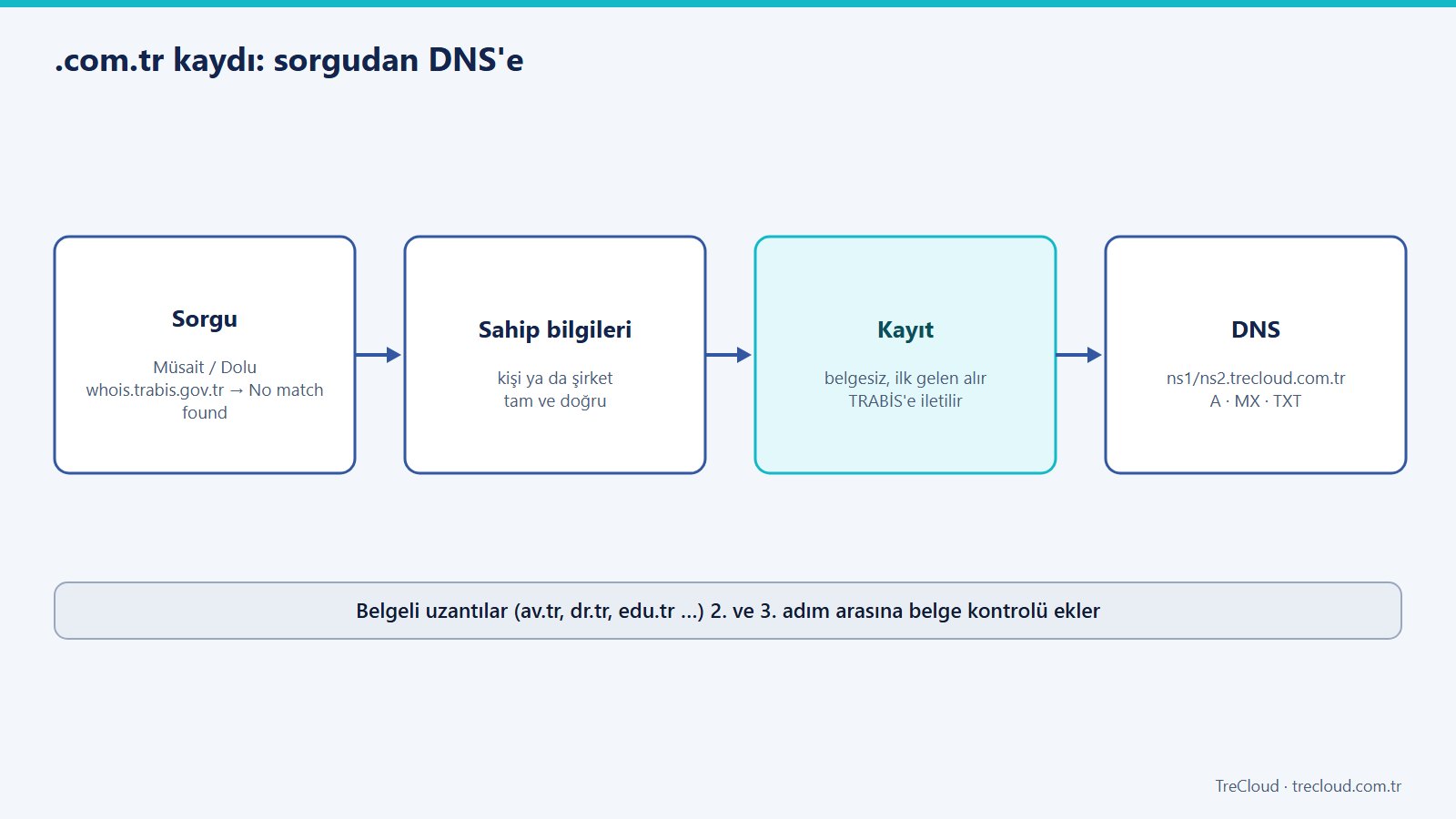
For an extension without documents, registration takes four steps. That is why the TreCloud domain menu says ".COM.TR: No documents, fast registration". The order below is enough for a business buying its first domain.
- Lookup: Search for the name on the domain page. If the result is "Available", the name is free; if it is "Taken", someone else has it.
- Holder details: Enter the person or company that will appear as the domain holder correctly. According to TRABİS, an application form that is not filled in completely and correctly is not accepted. The holder details requested at checkout appear on the form.
- Registration: Choose the term and complete the order. Because allocation is first come, first served, someone else can take the name until payment is made and the application reaches TRABİS; every hour you wait is a risk.
- DNS: Set the name servers and enter the records for your website and e-mail.
The most common holder-detail mistake is registering a name meant for the company under an employee's personal name. When that employee leaves, the dispute over the domain can drag on. Register a company name with the company's legal title and a personal name with your own name. If the title changes, keep the details up to date.
Checking availability and status with WHOIS
WHOIS is the lookup that shows whether a domain is registered and its basic status. To check from your browser, use the free WHOIS lookup page. If you like the command line, you can query TRABİS's WHOIS server directly for .tr names. On Ubuntu 24.04, install the whois package first if it is missing:
sudo apt install whois
whois -h whois.trabis.gov.tr ornek.com.tr
For a free name the answer is short: No match found for ornek.com.tr. For a registered name, the domain status, transfer status, registrar, name servers, creation and expiry dates are listed. If holder details are hidden on request, it says "Hidden upon user request". If the "Transfer Status" line says "The domain is LOCKED to transfer", the domain is locked against transfer.
Note the expiry date (Expires on). The most common reason for losing a domain is not technical but a forgotten renewal; turning on auto-renewal in the panel reduces that risk. For details, see the article on domain expiry dates.
Changing registrars (transfer)
According to TRABİS, a domain holder can change registrar on request and move the domain to another registrar. For .tr names, the key is the authorization (transfer) code obtained from the current registrar. You give this code to the registrar you want to move to, and the transfer starts with it.
In the TreCloud client panel, these actions are under My Domains, on the page of the relevant domain:
- Get Auth (EPP) Code: If you are moving the domain away from TreCloud, you get the code here.
- Transfer Lock: In the protection section. It blocks unauthorized transfers until you turn it off; turn it off before a transfer and turn it back on when the transfer is done.
- Transfer Domain: Used to bring a domain from elsewhere to TreCloud; the code from your current provider is required.
Be careful about timing. The notes on TreCloud's domain page, "usually completed in 5-7 days" and "a transfer extends the registration by one year", apply to generic extensions (such as .com and .net). The transfer time and any term extension for .tr names are not bound by these rules; before a .tr transfer, check the current terms at checkout or ask through a support ticket. The panel steps are described in detail in the domain transfer article.
After registration: name servers and DNS
A domain publishes nothing by itself; name servers tell it where to look. In the TreCloud panel, the Name Servers tab has two options: "Use Default Name Servers" (ns1.trecloud.com.tr and ns2.trecloud.com.tr) or "Custom Name Servers". With custom name servers, two entries are required and the third and fourth are optional. Changes can take up to 24 hours to propagate worldwide.
The A, CNAME, MX and TXT records on the Edit DNS Records screen apply only while the domain uses TreCloud name servers. If you use another DNS service, you edit the records there. See the DNS records guide for record types; changing name servers is also covered in the knowledge base. If you will also send e-mail from the new domain, add SPF, DKIM and DMARC records on day one; this is covered in the SPF, DKIM and DMARC article.
Common mistakes
First, waiting with "we will register once we collect the paperwork". There is no paperwork to wait for in extensions without documents, but there is a chance someone else takes the free name. Second, registering the name to the wrong person; this is the hardest mistake to fix later. Third, cutting the old site's DNS before the new name is ready. During the move, run the old and new names together for a while, then set up a permanent redirect.
Fourth, turning off the transfer lock and forgetting to turn it back on after the transfer. Fifth, treating a document-based extension (e.g. av.tr, dr.tr) as document-free and applying without documents. Missing documents hold up the application; reading the document list in advance shortens the process.
Frequently asked questions
Do I need a trademark certificate to get a .com.tr?
No. Since 2022, com.tr has been allocated without documents on a first come, first served basis under TRABİS rules. The extensions that require documents are av.tr, bel.tr, dr.tr, edu.tr, gov.tr, k12.tr, kep.tr, pol.tr and tsk.tr.
How do I know whether a .com.tr name is free?
Search on the domain page or run whois -h whois.trabis.gov.tr ornek.com.tr. Free names return "No match found".
How do I move a .tr domain to another provider?
Get the authorization (transfer) code from your current registrar and give it to the new registrar. If the transfer lock is on, turn it off first.
Does a .com.tr transfer also take 5-7 days?
The 5-7 days and one-year extension noted on the site apply to generic extensions. Check the time and terms for a .tr transfer at checkout or ask through a support ticket.
Can I get a domain in the example.tr form?
Yes. After the priority periods, these names are also allocated first come, first served. Some allocations may later go through a second check.
Comments0
No Comments Yet
Be the first to share your thoughts.
Please sign in or sign up to leave a comment.