

What to look for in web hosting: the lines before disk
An accounting firm compares two offers for its new website: one with 10 GB of disk, the other with 20 GB. It picks the bigger disk, and three months later the site shows a "508 Resource Limit Is Reached" error while the disk is half empty. When you ask what to look for in web hosting, the answer is rarely on the disk line; it is in the smaller lines below it. In this article we read a plan card line by line, using the values that actually appear on the TreCloud web hosting card.
Why disk alone is not enough
Disk is the space your site's files and email take up. A corporate brochure site or a small WordPress blog rarely needs more than a few GB. What slows a site down or stops it is usually not a full disk but the number of processes running at once, memory, disk throughput and the number of files. So when you compare hosting plans, read the whole card first and come back to disk size last.
TreCloud's web hosting plans (Başlangıç, Ekonomik, Kurumsal, Profesyonel) are a good example: disk goes 1, 5, 10 and 20 GB, yet many lines are identical across all four. The table below shows what differs and what is shared. Current prices appear on the product page and at checkout; we do not quote prices here.
| Line | Başlangıç | Ekonomik | Kurumsal | Profesyonel |
|---|---|---|---|---|
| Disk (Enterprise NVMe SSD) | 1 GB | 5 GB | 10 GB | 20 GB |
| CPU / RAM | 2 cores / 2 GB | 2 cores / 4 GB | 2 cores / 4 GB | 2 cores / 6 GB |
| I/O and inodes | 50 MB/s I/O, 250,000 inodes | |||
| Sites, email, databases | 1 website (unlimited subdomains), unlimited email and databases | |||
| Monthly traffic | 600 GB | |||
Inode and I/O limits
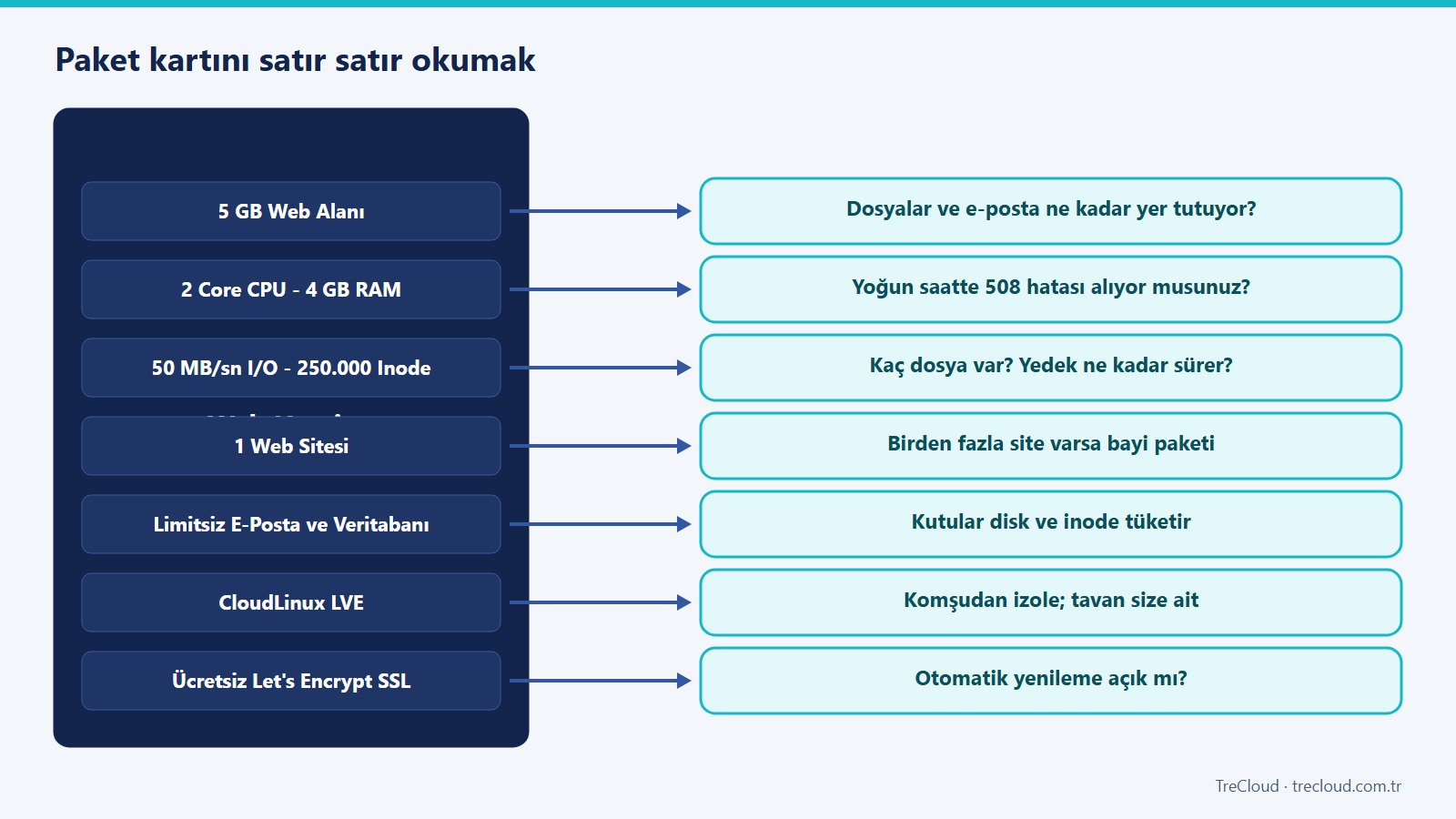
An inode is the record the server keeps for every file and folder. However small a file is, it uses one inode. If the card says "250,000 inodes", your account can hold at most that many files and folders. Inodes can run out while the disk is still empty, and when they do, nothing new can be written: a plugin update stops halfway, cache files are not created, incoming mail cannot be saved.
Let's do the math. In cPanel, email is usually stored as one file per message. An office with ten staff, each mailbox holding 25,000 messages collected over the years, reaches 250,000 files on its own. Add the WordPress core, plugins and the small files a page cache produces, and the limit arrives sooner than expected. The fix is usually not a bigger disk; it is clearing old cache, moving unused backup archives out of the account, or putting heavy email on a separate plan.
The I/O limit caps how fast the account can read from and write to disk. The TreCloud card says "50 MB/s I/O". Normal page views rarely come close; the jobs that push it are extracting a large zip, creating a full backup from the panel, or running an import of thousands of products. When these hit the limit they do not stop, they slow down. Operations per second (IOPS) are not listed on the card; if that matters to you, ask before ordering.
CPU, RAM and CloudLinux LVE
On shared hosting many accounts run on the same server. CloudLinux LVE gives each account its own CPU and memory ceiling, so a loop or an attack on a neighbouring site cannot choke yours. The flip side is that your site cannot go past its own ceiling either. An account that hits it usually shows visitors a "508 Resource Limit Is Reached" error. We cover this in detail in our article on CloudLinux and resource isolation.
On the TreCloud card, the values ranging from "2 Core CPU - 2 GB RAM" to "2 Core CPU - 6 GB RAM" are these LVE ceilings. In a shop taking 300 orders a day, with checkout and search running at the same time, the memory ceiling may fill before the CPU does; the same company's brochure site is comfortable with 2 GB. Entry processes and the number of processes are not listed separately on the card; if you are planning a high-traffic campaign, ask about these two values through a support ticket. We explain why "unlimited" plans that never state a number are a risk in our article on limit transparency.
PHP version
The PHP version your site runs on affects both speed and security. Security support for PHP 8.1 ended on December 31, 2025; for a site built in 2026, 8.3 or 8.4 is a sensible choice, and 8.5 has been available since November 2025. If an old theme or plugin will not run on a newer version, the problem is not the hosting but code maintenance.
The question to ask a provider is this: do you choose the PHP version, or is there one version on the server? At TreCloud, the hosting service page in the customer panel shows a "PHP Version" line, and the version is chosen per account. You can find how to enable extensions in the PHP version and extensions article.
Backups: who takes them, how you restore
"We have backups" says little on its own. Ask three questions: who takes the backup, where is it kept, and what do you have to do to get a file or database back? The TreCloud hosting page lists backups as "download from the panel"; with cPanel's backup tool you can take a copy of your account to your own computer or to separate storage. Confirm the frequency and retention of the provider's own backups through a support ticket before ordering.
Keeping backups only on the same server is half the job. Store the copy you download somewhere else, for example in an S3 object storage bucket, and test a restore at least once a year. We walk through the steps in taking and restoring a hosting backup.
SSL and email
In 2026 a site without HTTPS is not an option. Let's Encrypt SSL is free on TreCloud web hosting plans and renews automatically through cPanel. Let's Encrypt certificates are valid for 90 days, so check that automatic renewal is on rather than relying on manual renewal. If your organisation wants a specific certificate brand, DV certificates such as RapidSSL, Thawte SSL123 or PositiveSSL are available as separate products.
On the email side, the card says "unlimited email"; that means the number of accounts is unlimited, while the disk and inodes the mailboxes use come out of your plan. For a five-person office, email on hosting is enough. For a twenty-person team that sends large attachments and shares calendars, a separate business email plan (50 GB per account) is more comfortable. We weigh the decision in should email stay on hosting or move to its own plan.
Support, data location and migration
With support, what matters more than the "24/7" label is which channel a problem goes through and how it is recorded. TreCloud offers 24/7 support; when you open a ticket you choose a department (General, Orders, Accounting, Technical Support), a priority and the related service. The sales and billing team works weekdays 09:00-18:00. For a shop owner whose site goes down at midnight, this split matters: a technical problem is not left waiting, while a billing question may wait for the next business day.
Data location is about both speed and responsibility. If your visitors are in Türkiye, a server in Türkiye reduces latency. TreCloud hosting runs in its own data center in Kahramanmaraş. Where you measure from matters too; a test point abroad can give misleading results.
Migration is the reason many people put off switching hosts. TreCloud offers free migration: we move your existing site using a cPanel backup or FTP. The migration request is written separately as a support ticket, and the switchover time is planned together. Lowering the domain's TTL a day before changing DNS shortens the interruption.
Renewal price and billing period
In many offers the first-term price and the renewal price differ, and you only notice on the second year's invoice. Before ordering, ask: is the renewal amount the same as the first term, which currency is the price tied to, and how does the monthly cost change with a longer term? At TreCloud the current amount appears on the product page and at checkout, and billing periods can be compared on the order screen.
Leaving is part of renewal too. In the TreCloud customer panel you can turn automatic renewal on or off from the service page. On cancellation, "At the end of the billing period" keeps the service running until the term ends; with "Immediately" the remaining time is not refunded. Reading these rules before ordering is the shortest way to avoid surprises later.
Quick summary
When choosing web hosting, do not read the card top to bottom; read from your site's needs to the card's lines. Going in this order prevents most wrong choices:
- Estimate your file and email count, then check the inode line.
- Think about the processing load at peak hours, then check the CPU and RAM ceilings.
- Confirm the PHP version your software requires.
- Find out where backups are kept and how you will restore.
- Read the migration, renewal and cancellation rules before ordering.
If you want to host several sites under one account, look at the reseller hosting plans; if you need to install your own software, the hosting or VDS decision tree is the next step.
Frequently asked questions
What happens when inodes run out?
No new files can be written; updates may stop halfway and incoming email may not be saved. Clearing cache and old backup archives usually frees enough room.
Does an NVMe disk make a site fast on its own?
No. NVMe shortens read times, but a heavy theme, many plugins and an old PHP version easily eat up that gain.
Can I host more than one site on a hosting plan?
TreCloud web hosting plans include 1 website and unlimited subdomains. For several separate sites, reseller hosting is the right fit.
Is migrating my site paid?
Migration is free at TreCloud. You request it through a support ticket; timing and the switchover window are agreed in the ticket.
Comments0
No Comments Yet
Be the first to share your thoughts.
Please sign in or sign up to leave a comment.