

Hosting automation with WISECP and Tre modules
At a small provider with twenty customers every order follows the same routine: payment arrives, someone creates the virtual server by hand, emails the password, writes a reminder when the invoice is due and shuts the server down if payment does not come. When the customer count reaches two hundred, that routine only exists on paper. WISECP hosting automation moves this chain into software: orders, invoices, provisioning and suspension run in one system under the same rules. In this post we explain what WiseCP does, where the server module fits and the Tre modules developed by TreCloud.
What does WiseCP do?
WiseCP is sales, billing and customer management software written for companies that sell hosting and cloud services. You define your products and prices; the customer orders on your site, pays and manages the service from their own customer panel. Issuing invoices, generating a new invoice on the renewal date, sending reminder emails and collecting support tickets are all jobs of the same software.
The real gain of automation is in the service lifecycle. A service goes through four basic steps: creation (setup once the order is approved), suspension (when payment is late), unsuspension (when payment arrives) and termination. Package upgrades and add-on sales join this cycle. WiseCP runs these steps with a scheduled task (cron) and rules; for example, it suspends a service once the number of days you set after an overdue invoice has passed. That is why a regularly running WiseCP cron is a precondition for automation.
TreCloud runs its own site on WiseCP 5. The cart, invoices and customer panel you see when ordering from us are built on this software.
The role of the server module
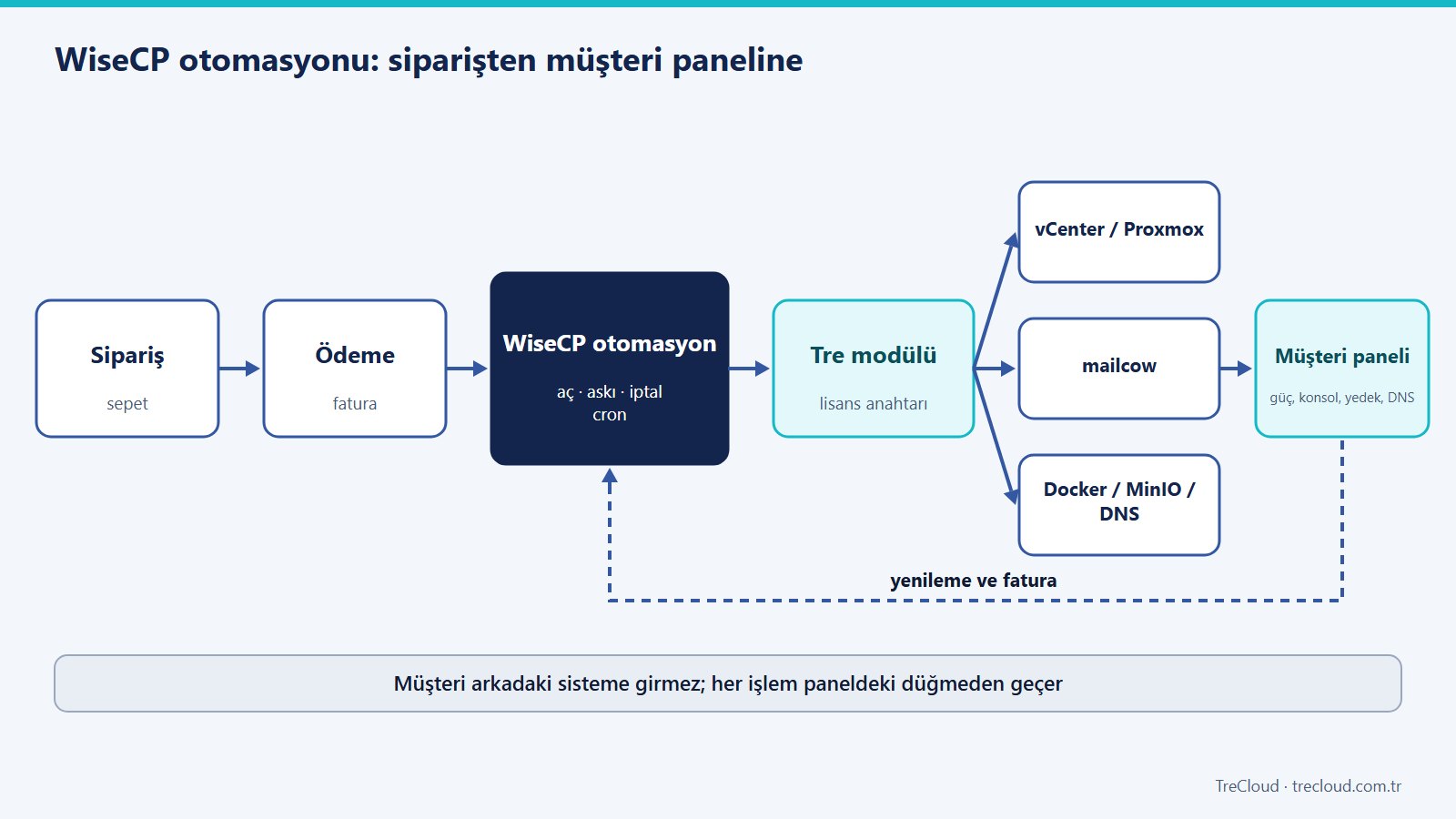
WiseCP issues the invoice and decides "this service should be created", but it does not itself know how to clone a virtual server or how to create an email domain on a mail server. That is the module's job. A server module translates WiseCP's lifecycle commands (create, suspend, unsuspend, terminate, upgrade) into the language of the system behind it: vCenter, Proxmox, mailcow, a DNS server or a Docker server.
The module's second job is the customer side. A good module means the customer never has to log in to the system behind it separately; power buttons, console, password reset, backups and graphs sit on the service page in WiseCP. The customer sees one panel, and you do not have to expose the management screen of the underlying system to customers.
Modules come in different types. Server modules work under Products › Hosting/Server, product modules as product group modules, and add-ons under Tools › Add-ons. The order of installation and first settings is written step by step in WiseCP module installation.
Tre modules
TreCloud packages the automation it uses on its own infrastructure as modules and sells them on the WiseCP marketplace (marketplace.wisecp.com). The full list is in the WiseCP module catalogue; below we summarise the most asked-about ones with the features listed in their guides.
Virtual and physical servers
TreHypervisor sells VDS and VPS through vCenter and ESXi. Once payment is complete a template is cloned; CPU, memory and disk are set to the plan, an IP is assigned, the password is written and the machine is powered on. Power, console, reinstall, SSH key, snapshots, rDNS and resource graphs are on the WiseCP service page; the customer never logs in to vCenter. For non-paying customers you define suspension and deletion rules per product, and if you wish each step waits for an administrator's approval. Add-ons such as extra CPU, memory, disk and IP are applied to the machine the moment they are purchased.
TreProxmox does the same for Proxmox VE: KVM and LXC, cloud-init provisioning, browser console, backups and firewall in the customer panel. TreDedicated covers physical servers and TreVDC virtual data centres.
Email, DNS and IP
TreMail sells a domain on your own mailcow server as a WiseCP service. Once the order is approved, the domain and DKIM key are created in mailcow; the customer manages mailboxes, aliases and DNS checks from the service screen without logging in to the mailcow panel. TreDNS does two jobs: selling DNS hosting and automatically writing reverse records (PTR) for addresses given to servers. TreIP keeps your IPv4 and IPv6 blocks, assigns an address from the right subnet to each order, never gives the same address to two customers and writes the PTR record to TreDNS if it is installed.
Applications, storage and logging
TreApps installs and sells ready-made applications such as n8n, Nextcloud, Uptime Kuma and Vaultwarden on your Docker server with one click; each application has its own disk, network and CPU/memory limit. We showed what the customer side looks like in What is n8n and application hosting. The TreStorage package bundles two modules: TreBackup sells virtual machine backups, and TreObject sells S3-compatible object storage on your own MinIO server. TreLog5651 archives NetFlow and syslog records sent from the customer's device for the retention period (730 days by default); on cancellation records are not deleted but archived.
Reselling
TreBayi is a free add-on. You sell services from your provider's infrastructure on your own WiseCP site, under your own brand and prices; the cost is deducted from your balance with the provider, and your customer does not see the provider's name.
These modules also run in TreCloud's own customer panel. The management screens of the VDS, application hosting, S3 and email services you buy from our site are the customer side of these modules. Buying a module as software and buying a service from TreCloud are different things; we explained the difference in licences and TreHypervisor.
How does licensing work?
Every Tre module has a licence code; for example treapps for TreApps and trehypervisor for TreHypervisor. When you first open the module page a licence box appears. The domain line fills in automatically with the panel domain the page is opened on. You copy the licence user and the 48-character licence key from the licence service in your trecloud.com.tr account and press "Query licence". The licence is bound to your panel's domain; a second active licence for the same module cannot be opened on the same domain and IP.
The licence is not lost on update. The new version is downloaded from the WiseCP marketplace and extracted into the same folder; the license.local.php file that holds the licence data is not in the package, so it is not deleted. After the update, open the module page once and clear the browser cache if needed. Details are in WiseCP module update.
When moving the panel to another server or domain, you enter the new domain and IP with "Change server" on the Management tab of your licence service. If you reinstalled the module on the same server, use "Reset installation binding"; it runs once every five minutes. The steps are in moving a WiseCP licence.
Questions to ask when choosing a module
A module is only as useful as the infrastructure behind it. Answering the questions below before buying reduces surprises after installation.
- What is your infrastructure? vCenter/ESXi means TreHypervisor, Proxmox VE means TreProxmox. For email you need your own mailcow server, for S3 your own MinIO server, for applications a separate Docker server.
- Do your WiseCP version and server requirements fit? Tre modules are for WiseCP 5; requirements such as PHP version and ionCube Loader are listed on each module's installation page.
- Is the scheduled task running? Usage metering, automatic backups and post-cancellation deletion depend on cron.
- What will your customers do themselves? Check the customer screen list in the guide; anything not there will be done by your support team.
- What happens to non-paying customers? Decide the suspension and deletion rule, the grace period and the approval step in advance.
- Who will update, and when? Name someone who reads the release notes and schedules updates for a quiet hour.
Each module's guide is public at docs.trecloud.com.tr, and WiseCP's own documentation at docs.wisecp.com. Reading the "What it does" and "Installation" sections of the guide before buying is the fastest way to see whether a module fits your infrastructure. If you still have questions, open a support ticket from the customer panel.
Short summary
WiseCP manages orders, invoices and the service lifecycle; the server module applies those decisions to the system behind it, such as vCenter, Proxmox, mailcow or Docker, and gives the customer a single panel. Tre module licences are bound to the panel domain and are kept on update. The right module is chosen starting from your infrastructure and the jobs you want customers to do themselves.
Frequently asked questions
Where are Tre modules bought?
Modules are downloaded from the WiseCP marketplace; licence data is in the licence service in your trecloud.com.tr account. Product cards and current prices are on the WiseCP module catalogue page.
Do I need to re-enter my licence after updating a module?
No. The license.local.php file is not in the update package, so it is not deleted. Opening the module page once after the update is enough.
I moved my panel to a new server; what happens to the licence?
Use "Change server" on the Management tab of the licence service in the trecloud.com.tr customer panel to enter the new domain and IP; the record on the licence server is updated.
Is there a fee for TreBayi?
TreBayi is a free add-on. The cost of the services you sell is deducted from your balance with your provider.
Comments0
No Comments Yet
Be the first to share your thoughts.
Please sign in or sign up to leave a comment.